
General settings
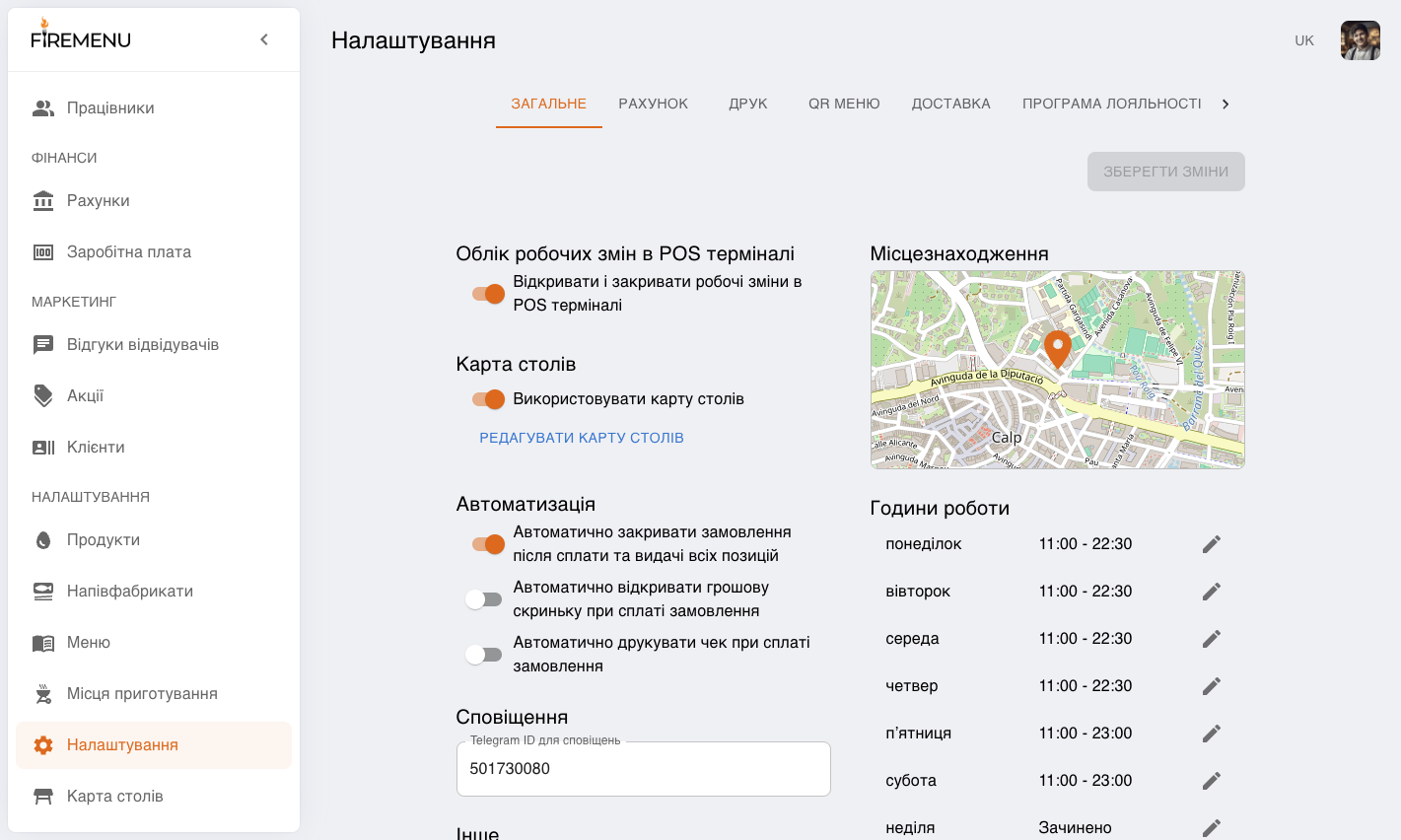
The «General» tab is not just a list of toggles—it defines how your venue operates day to day: how POS starts, what happens after payment, how operational receipts are printed, whether orders can be edited offline, and how the system drives time slots for QR table booking.
Contents:
- What it is and when to use it
- How the “Work shift tracking in POS” block works
- How “Table map” affects the flow
- How “Location” is used
- How the “Automation” block works after payment
- How to read the “Other” block
- How “Working Hours” affect guest flows
- How “Shift start time” affects reports
- Common issues and fixes
- Related articles
What it is and when to use it
- Use the «General» tab when launching a new venue, changing how the floor and tills work, or before expanding the team.
- The section is for roles with access to restaurant settings (admin / owner).
- Some options are plan-gated: the POS shift block is available on Plus, and the automation block on Pro.
- Treat these as house rules that apply to all staff—change them as a policy, not ad hoc on a single shift.
How the “Work shift tracking in POS” block works
- «Open and Close Work Shifts in POS Terminal» enforces that staff can only work in POS when a shift is open.
- When it is on, POS will not start service without an open shift: the user sees «The work shift is not open yet».
- Use it when you need to:
- assign responsibility for each till session;
- separate turnover by shift;
- enforce clear start/end of service.
- Avoid turning it on if your operation is very simple (e.g. one person all day with no handover).
How “Table map” affects the flow
- «Use table map» switches the main POS screen between a visual floor plan and a list-style order flow.
- For seated dining, the map reduces wrong-table mistakes and speeds up service.
- For formats without seating (takeaway, small counter), the map often adds noise without benefit.
How “Location” is used
- The venue location drives distance to the customer for delivery pricing and zone-based delivery fees.
- After a move or service-area change, verify the pin—otherwise delivery quotes can be wrong.
How the “Automation” block works after payment
- «Automatically open cash drawer when order is paid» speeds up cash-heavy lanes.
- «Automatically print receipt when order is paid» removes manual steps and reduces missed receipts—useful when you keep paper copies of every simplified invoice.
- «Automatically close order after payment and delivery of all items» closes the order without an extra tap when the system considers it ready to close.
- Guidance:
- enable when your process is stable and the team follows one playbook;
- keep manual control if you often handle partial service, complex returns, or onboarding new staff.
How to read the “Other” block
- «Disable item grouping in the kitchen ticket» prints each line separately on the kitchen ticket instead of aggregating.
- Turn on when line-level detail matters (comments/modifiers).
- Leave off when compact tickets are easier to read on the pass.
- «Allow changing orders in offline mode on mobile devices» lifts the lock on editing orders on mobile POS without connectivity.
- Use only as an emergency override—sync conflicts are more likely after reconnect.
- Separate switches «Print section summary in Z-report», «Print category summary in Z-report», and «Print position summary in Z-report» control how detailed sales are printed in the Z-report:
- sections — top level;
- categories — mid level;
- items — maximum detail.
- «Telegram ID for notifications» is used for alerts such as online table bookings via QR menu and new delivery orders.
How “Working Hours” affect guest flows
- «Working Hours» are not only internal—they drive QR table booking:
- available time slots follow this schedule;
- outside hours the guest sees the venue as closed.
How “Shift start time” affects reports
- «Shift start time» defines the operational day boundary for certain reporting (especially when the business day should not start at midnight).
- Late-night venues should align this with the real handover to avoid artificial splits in revenue between calendar days.
Common issues and fixes
- Problem: After payment, orders behave unexpectedly (do not close / do not print).
Fix: Reconcile the «Automation» block with your real counter process—do not enable every automation at once. - Problem: “Day” boundaries in reports look wrong for overnight trading.
Fix: Review «Shift start time» so analytics align with your operational day. - Problem: Kitchen says tickets are either too folded or too long.
Fix: Tune «Disable item grouping in the kitchen ticket» for your kitchen’s rhythm. - Problem: Discrepancies after mobile offline work.
Fix: Treat offline editing as emergency-only and resync immediately after connectivity returns.